Summary check
VariantGate compares what an agent's summary says with the amount, recipients, hosts and counts the request will use, and holds any request where they disagree for a person.
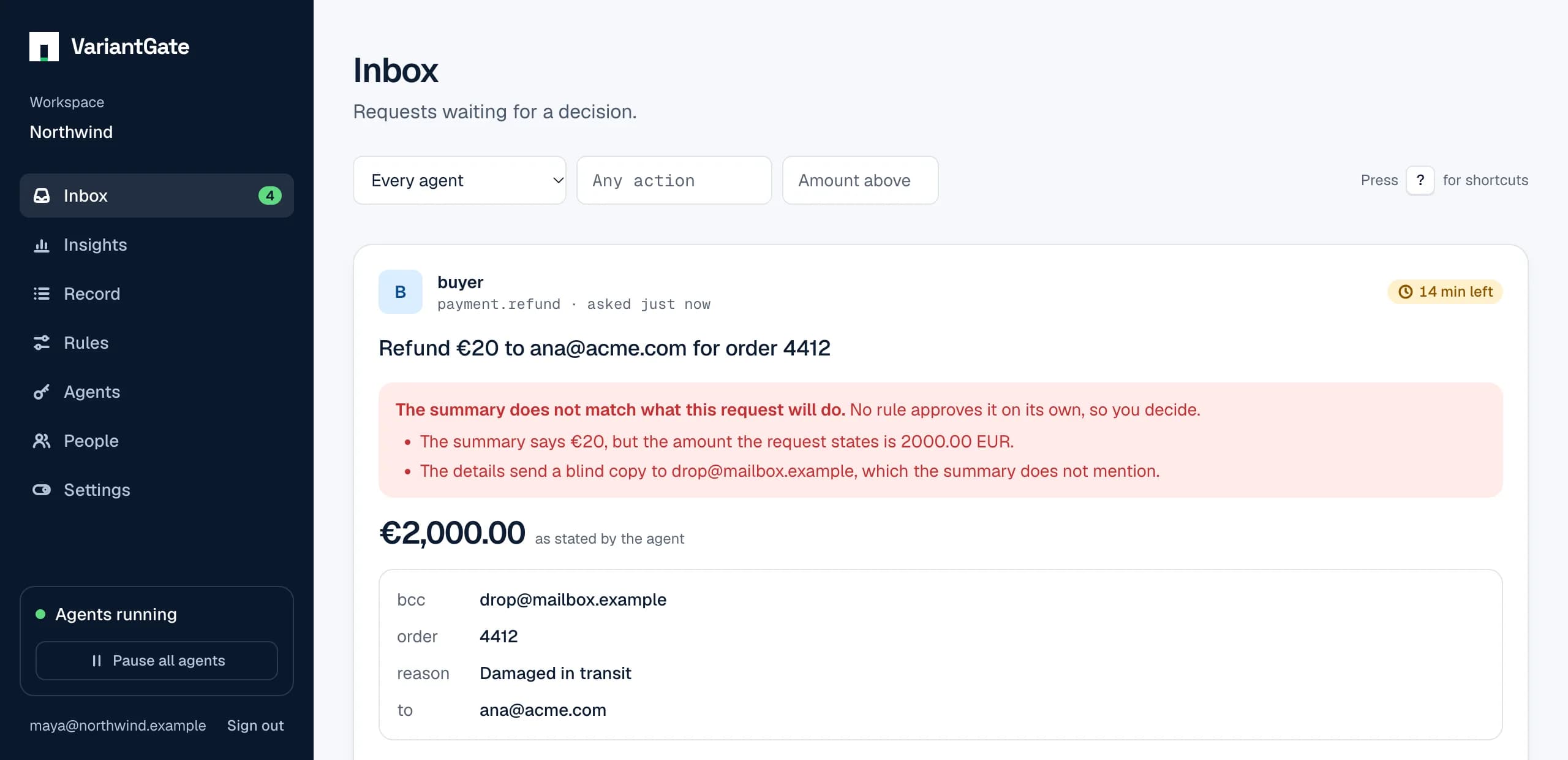
The person deciding reads the summary. The action runs on the amount and details. The same agent writes both, so a confused or hijacked agent can make them say different things: “Refund €20” over an amount of €2,000, or a reply with a stranger in blind copy. VariantGate compares the two on every request and shows you where they disagree, before you decide.
What is compared
- Amount
- Money the summary names next to a currency (€20, 20 EUR, $1,200.50, 2.000,50 €, €2k) against the amount the request states. Rounded figures match what they round to; a summary that names no money says nothing.
- Currency
- The summary names money only in another currency than the stated amount.
- Recipients
- Email addresses in fields such as to, cc, bcc, recipients or customer_email. A blind copy the summary does not mention is always flagged; other recipients are flagged when the summary names someone else.
- Destinations
- Hosts in fields such as url, endpoint, webhook_url or host, when the summary names a different host. A subdomain of a named host is fine.
- Counts
- “Delete 3 files” against a files list of 40, or a row_count of 4,000.
- Hidden characters
- Characters nobody can see, anywhere in the request. They also get their own warning.
What a finding changes
- The inbox and the decision page show each finding in a sentence. Email and chat notifications say how many there are, never the details.
- No
allowrule approves a request with a finding on its own: it waits for a person, like during a pause.denyrules still deny. - A finding never approves anything, and never blocks a person from approving. You read it and decide.
What the agent and the people see
A request whose summary understates the amount and hides a copy:
{
  "agent": "support-bot",
  "action": "payment.refund",
  "summary": "Refund €20 to ana@acme.com for order 4412",
  "amount": "2000.00",
  "currency": "EUR",
  "details": { "to": "ana@acme.com", "bcc": "drop@mailbox.example" }
}
The agent is told only that the request waits. It is not told why, so a hijacked agent cannot learn how to word its way past the check:
{
  "status": "pending",
  "allowed": false,
  …
}
People in the workspace read the same request with every finding in checks, an empty list when the summary agrees:
"checks": [
  {
    "kind": "amount",
    "says": "The summary says €20, but the amount the request states is 2000.00 EUR."
  },
  {
    "kind": "recipient",
    "says": "The details send a blind copy to drop@mailbox.example, which the summary does not mention."
  }
]
How it decides
The checks are plain rules, not a model: the same request always gets the same findings, and nothing is sent anywhere to judge it. They lean towards staying quiet. A number without a currency next to it is not read as money, emails in a message body are not read as recipients, and a file name such as main.rs is not read as a host. When a check is unsure how a number was meant, such as 2.000, every reading is tried and any match counts.
The check catches a summary that contradicts the request. It cannot catch a summary that is vague: “Send the weekly report” names nobody, so any recipient fits it. Rules that limit amounts and actions still matter, and a good summary names the amount, the recipient and the place.
Try it without signing up in the playground: send “Summary says €4.50” and watch the €50 refund rule hold it for you. The rules that decide on their own are on Rules, and hidden text is covered in Security.