Runs
Tag an agent's requests with a run id and see one session, job or conversation as a single timeline of asks, decisions and outcomes. Any member can stop the run; what it asks next is refused.
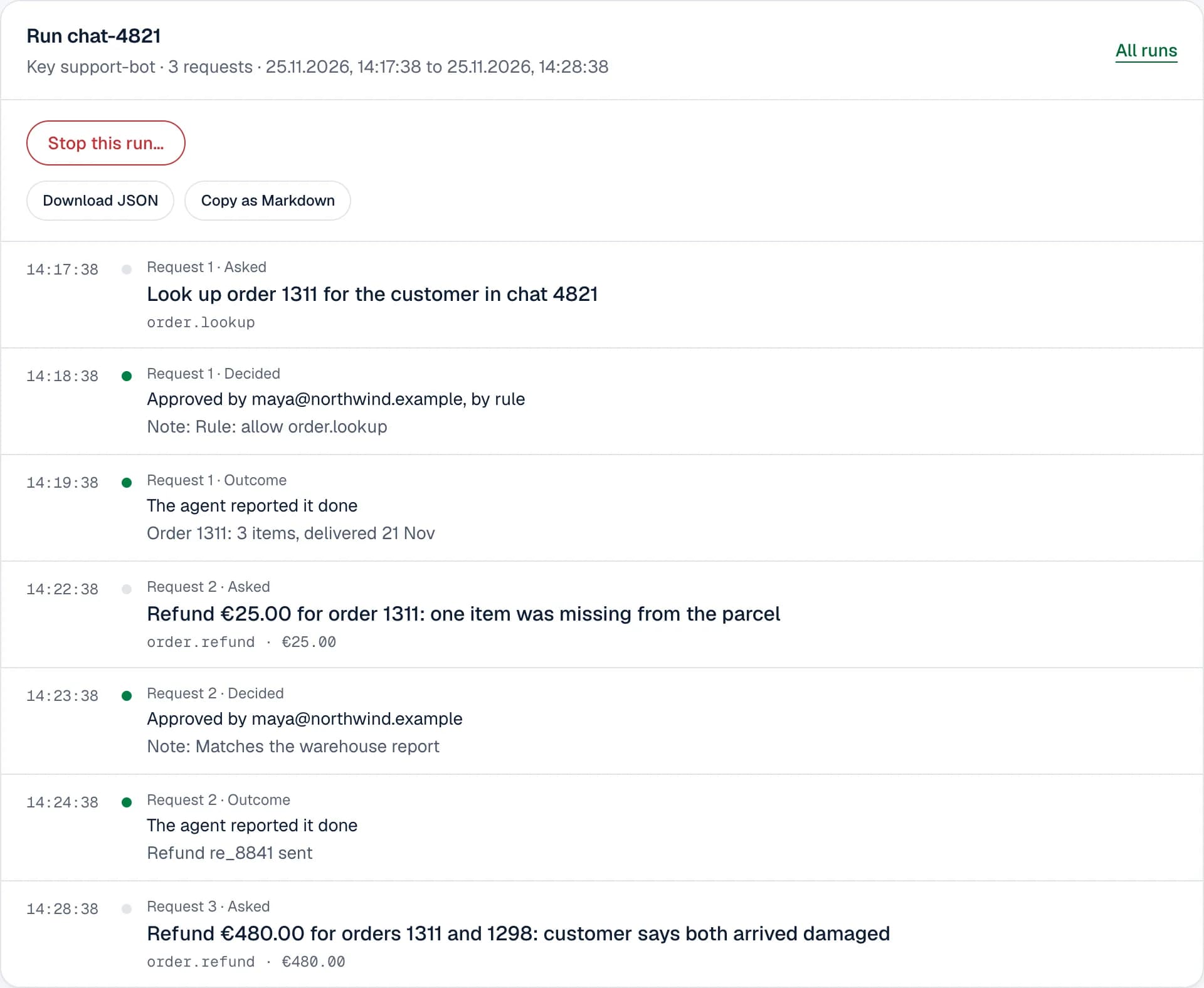
A run is one piece of an agent’s work: one Claude Code session, one job, one support conversation. When the agent tags its requests with a run id, the app shows that run as one timeline: everything it asked, how each ask was decided and flagged, and what the agent said happened. Any member can stop the run. What waits in it is denied, and whatever it asks next is refused, while the agent’s other work carries on.
Name the run
A run id is any text of letters, digits and . _ : - that stays the same for the whole piece of work. It belongs to the agent key that asks: the same id sent with two keys is two runs. In TypeScript, pass run to ask:
import { ApprovalClient } from "@variantgate/agent";

const approvals = new ApprovalClient({
  agent: "support-bot",
  apiUrl: process.env.VARIANTGATE_API_URL ?? "https://api.variantgate.com",
  key: process.env.VARIANTGATE_KEY ?? "",
});

const asked = await approvals.ask(
  {
    action: "payment.refund",
    summary: "Refund €25.00 to kim@example.com for order 1301",
    amount: "25.00",
    currency: "EUR",
    // Every ask of this conversation carries the same run id.
    run: `support:${conversation.id}`,
  },
  30
);
In Python, run=:
from variantgate import ApprovalClient

approvals = ApprovalClient("support-bot")  # VARIANTGATE_KEY from the environment

asked = approvals.ask(
    "payment.refund",
    "Refund €25.00 to kim@example.com for order 1301",
    amount="25.00",
    currency="EUR",
    run=f"support:{conversation.id}",
    wait_seconds=30,
)
Code that names no run takes it from VARIANTGATE_RUN, which suits a job or a script that is one run from start to end:
# A nightly job: every ask of this one process is one run.
VARIANTGATE_RUN="nightly-sync-$(date -u +%Y-%m-%d)" node sync.js
Over plain HTTP it is the run field of the request:
curl -X POST https://api.variantgate.com/v1/requests \
  -H "Authorization: Bearer gl_YOUR_KEY" \
  -H "Content-Type: application/json" \
  -d '{
    "agent": "support-bot",
    "action": "payment.refund",
    "summary": "Refund €25.00 to kim@example.com for order 1301",
    "amount": "25.00",
    "currency": "EUR",
    "run": "support:4821"
  }'
What sends one for you
- Coding-agent hooks
- Send the agent's own session id, such as claude-code:<session_id> for Claude Code, so each session is its own run without any setup.
- variantgate mcp-proxy
- Makes one run per process: everything a client asks through one proxy, from start to exit, is one run.
- SDKs and HTTP
- Send the run you name, or the one in VARIANTGATE_RUN. Without either, a request belongs to no run and shows in the inbox and the record as before.
See the Claude Code hooks and mcp-proxy for how they are set up.
The timeline
Under Agents, Recent runs lists the latest runs with their counts and a Stopped badge. A request that belongs to a run says so in the inbox and the record, with Open run beside it. A run’s timeline lists, in time order:
- Each ask: when, the action, the summary and amount, and what was flagged: a summary check finding, an untrusted source, or a request unusual for this agent.
- How it was decided: by whom, or by which owner’s rule, with the note.
- Its cancel window: went ahead, or cancelled and by whom.
- What the agent reported as the outcome, and asks that expired or were withdrawn.
- The stop, if a member stopped the run, at the end.
Stopping a run
Any member may stop a run, not only owners, because stopping is the safe direction. Stop this run first says what it will do, then:
- Every request still waiting in the run is denied.
- Every approval still inside its cancel window is cancelled, so the agent never gets
allowed: truefor it. - The run’s requests read
paused: trueandpause: "run", withallowed: false. - Anything the run asks afterwards is refused, and nothing of it is kept.
What the agent gets back for an ask after the stop:
HTTP/1.1 409 Conflict

{
  "error": {
    "code": "run_stopped",
    "message": "…"
  }
}
The SDKs, the hooks and mcp-proxy treat this like any other refusal: the action does not run. The timeline counts the asks refused since the stop. Over the API, a stop is one call, and stopping again changes nothing:
curl -X PUT \
  https://api.variantgate.com/v1/workspaces/$WORKSPACE_ID/agent-keys/$KEY_ID/runs/support:4821/stop \
  -H "Authorization: Bearer YOUR_SESSION_TOKEN"

{ "denied": 1, "cancelled": 0 }
What a stop does not do
- It does not touch the agent’s other runs, its requests outside a run, or other agents. To stop the agent itself, pause its key; to stop everything, use the emergency stop.
- It cannot be undone. If a person wants the work to go on, the agent starts a new run with a new id.
- It holds a run, not an agent: an agent that picks a new run id can ask again, and each ask is decided as usual. A pause of the key is what stops that.
- It does not undo what the agent already did after an approval. The timeline shows what was allowed and what the agent reported.
Export for an incident review
A run’s timeline has two exports. Download JSON saves the run exactly as the API returns it: the key, the run id, the stop, and every request with its full view. Copy as Markdown copies a write-up to paste into an incident document: the run, the key, the period it covers, each request with its decision and outcome, and the timeline, with times in UTC. Over the API:
# The latest runs, latest activity first
curl "https://api.variantgate.com/v1/workspaces/$WORKSPACE_ID/runs?limit=50" \
  -H "Authorization: Bearer YOUR_SESSION_TOKEN"

# One run, every request oldest first
curl https://api.variantgate.com/v1/workspaces/$WORKSPACE_ID/agent-keys/$KEY_ID/runs/support:4821 \
  -H "Authorization: Bearer YOUR_SESSION_TOKEN"
Try it without signing up in the playground: a support agent asks four times in one conversation, and you can stop the run halfway, while a refund from its other conversation still goes through.