Insights
How approvals are going over 7, 30 or 90 days: what each number means, how it is worked out, and how rule suggestions are chosen.
Viewing insights is included on every plan. Turning a suggestion into a standing rule requires Pro or above.
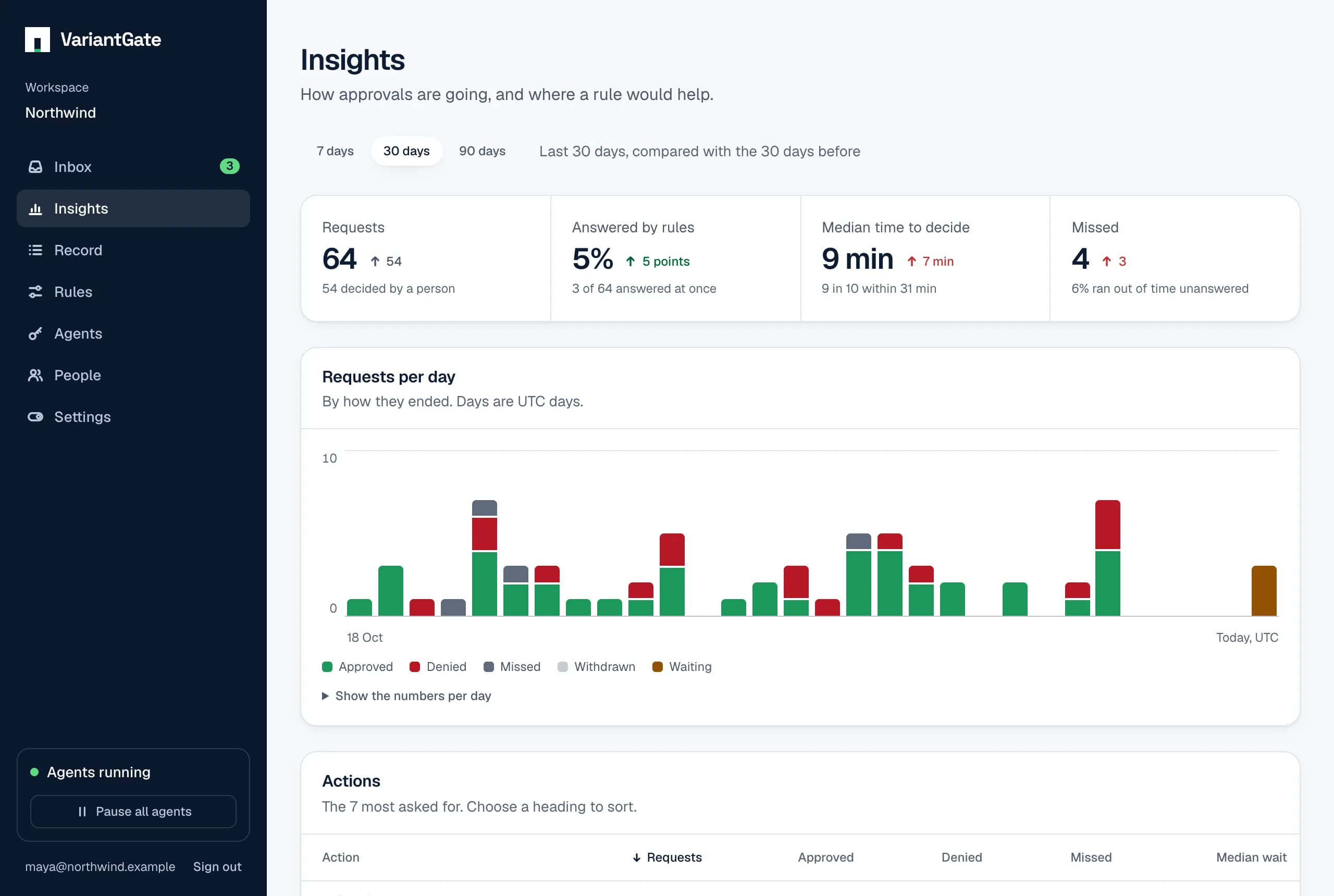
Insights shows how approvals went over the last 7, 30 or 90 days, next to the same number of days before. Use it to see where people spend time deciding, and which decisions a rule could make for them.
The period
A period covers whole days in UTC, today included: the last 30 days start at midnight UTC 29 days ago. The period before is the same number of days just before it. A request belongs to the day it was asked, whenever it was decided.
How a request ended
Every request ends in one of five ways. Together they add up to the number of requests.
- Decided by a person
- Someone in the workspace approved or denied it, from the inbox, an email, or a Slack, Teams or Discord message.
- Decided by a rule
- A standing rule approved or denied it the moment it was asked. An ask rule decides nothing: what it catches waits for a person.
- Missed
- Nobody answered before its time ran out, so the agent did not act. A request still marked waiting after its deadline counts here too.
- Withdrawn
- The agent took it back before anyone decided.
- Waiting
- Still open, and still within its time.
The four numbers at the top
- Requests: everything agents asked for in the period. The change is how many more or fewer than in the period before.
- Answered by rules: the share of requests a rule decided. The change is in percentage points: from 20% to 30% is 10 points. A rising share means fewer requests reach a person.
- Median time to decide: half of the decisions people made took longer than this, half took less. Under it, “9 in 10 within” is the 90th percentile: nine in ten decisions came within that time. The median shows the usual wait; the 90th percentile shows the slow ones, which are the ones agents give up on.
- Missed: requests that ran out of time with no answer. If it climbs, people are not seeing requests in time: turn on email or Slack notifications, or give requests more time.
Times count only decisions made by a person. A rule answers at once, so counting it would make the wait look shorter than it is. Green means a number moved the way you want and red means it moved the other way; the number of requests is neither.
Per day, per action, per person
- Requests per day: one bar per UTC day, split by how the requests ended. Point at a bar, or focus the chart and use the arrow keys, to read a day. The same numbers are in a table under the chart.
- Actions: the 20 most asked-for actions, with how they ended and the median wait for a person. Choose a heading to sort.
- People: each approval and denial a person gave, and the median time from asking to their answer. On a request that needs two or three people, each approval counts for the person who gave it. Someone who has left stays listed with what they decided.
- Money: amounts approved and denied, per currency, as the agents stated them. An approval that lowered the amount counts at the lower amount. Different currencies are never added together.
Rule suggestions
When people approve the same thing again and again, Insights suggests a rule that would have answered it. A rule is suggested only when all of these are true:
- The same agent key asked for the same action at least five times in the period.
- A person approved every one of those requests exactly as asked: none was denied, changed before approval, missed, withdrawn, still waiting or answered by a rule.
- No rule reaches that key and action already, whatever the rule does. A rule for every agent, or for a family such as
email.*, counts. - The key has not been revoked, and no owner dismissed it.
The suggestion is an “always allow” rule for exactly that key and that action, never for every agent or a family of actions. When the requests stated amounts, it allows up to the largest one approved; anything above it, or without an amount, still waits for a person, as amount limits always work. When amounts came in more than one currency, nothing is suggested, because one rule holds one limit.
Only owners see suggestions, because only owners write rules. Make this rule opens the rule form with the rule filled in. Nothing is saved until you add it, and it is then recorded in your name like any rule you write. Dismiss hides a suggestion for good, for every owner.
A suggestion describes the past, not a promise. Five approvals say the action was fine those five times. Read the action and the limit before you add the rule; the emergency stop still overrides it.
Who can see it
Everyone in the workspace sees the numbers. Agent keys cannot read them. The same numbers are in the API at GET /v1/workspaces/{id}/insights?days=30, with days set to 7, 30 or 90.