The record
Who asked, who decided, when and why, and how to export it.
Viewing the sealed record, verifying it and viewing the activity log are included on every plan. Downloading either CSV audit export, and the report per agent, require Business or above.
Everything that was decided or expired stays on record. It is the answer to the question someone will eventually ask: who allowed this?
What each entry keeps
- Who asked
- The agent, by the name it gave, and the key it asked with.
- What for
- The action and the summary the person saw.
- The outcome
- Approved, denied, expired or withdrawn.
- Who decided
- The person, or the owner whose rule decided.
- Why
- The note, when one was given.
- What came of it
- Whether the agent reported the approved action as done or failed, and its note.
- When
- When it was asked and when it was settled.
In the app
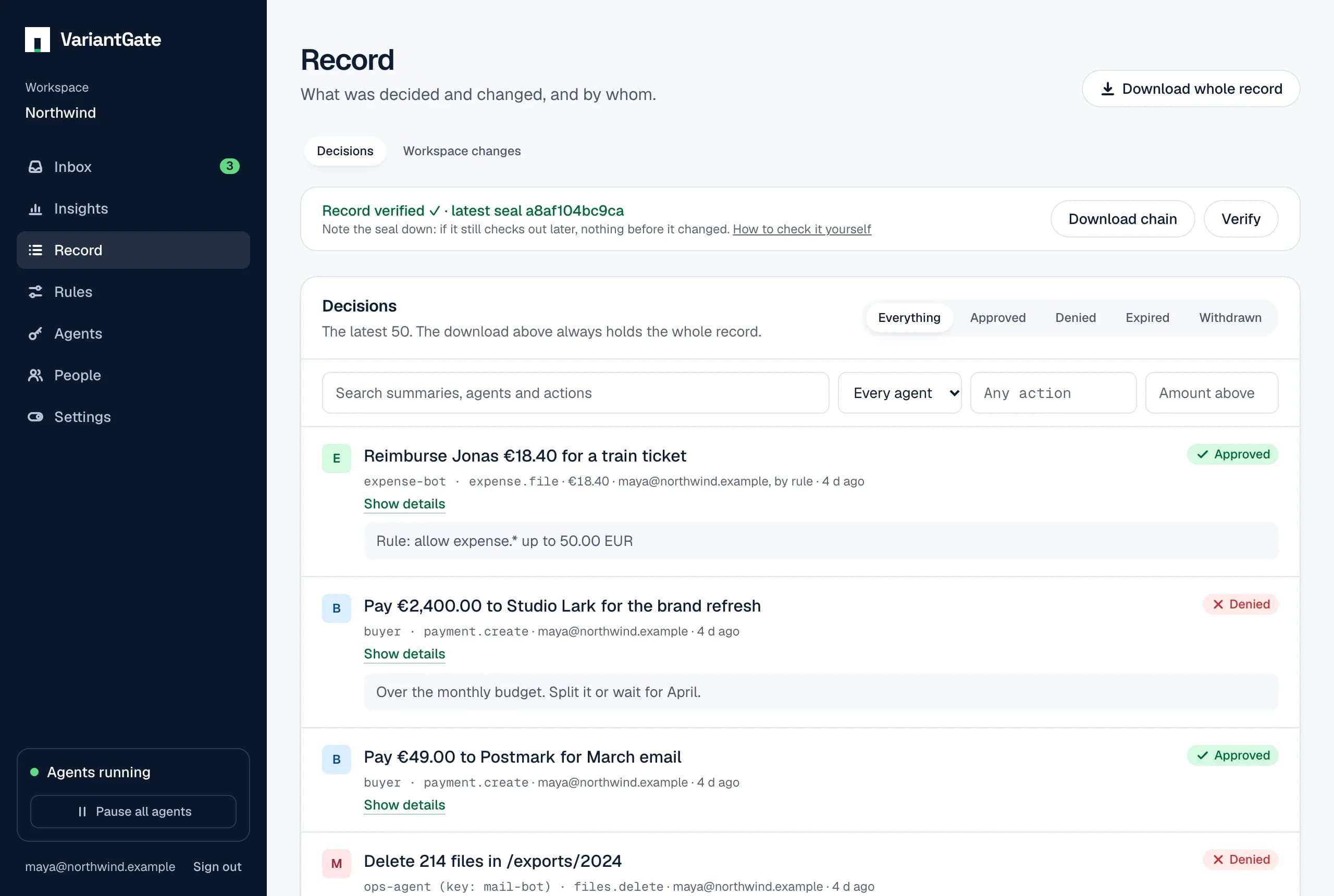
- Record lists the latest decisions and can show only approved, denied, expired or withdrawn ones.
- Insights shows the last 7, 30 or 90 days: requests per day, how they ended, how long people took, and the busiest actions.
- Agents has a report per agent over 30 days, 90 days or 12 months: what each asked for, how it was decided, how long people took, what it reported back and the money approved. Choose an agent to see it day by day, or download the report as CSV.
As a file
Download whole record gives a CSV file for an auditor or a spreadsheet. Values that could be read as formulas are made safe, so a request’s text cannot run anything when the file is opened. One file holds the 10,000 most recent entries and says so when older ones were left out.
Workspace changes
Record also keeps every change to the workspace itself. Switch Record from Decisions to Workspace changes to see them, newest first, and narrow them to one kind. Members can read them; agent keys never can.
- Agent keys
- Created, revoked, paused, resumed, and what each may ask for changed.
- Rules
- Written, from the Rules page or with Remember, and removed.
- Name and emergency stop
- The workspace renamed, with its old and new name; paused and resumed.
- People
- Who joined with an invitation, whose role changed, who was removed and who left, including by deleting their account.
- Invitations
- Created and withdrawn.
- Notifications
- The chat webhook (Slack, Teams or Discord) changed or removed. Where it points is a secret and is never logged.
- Signed webhooks
- Added, removed, turned off or on, and their signing secret replaced, by host and label.
- Plan
- Changed by a payment through Stripe, in Stripe's name; the monthly request cap changed by an owner.
Each change says when it happened, who made it and what it was made to. Changes are sealed into the same chain as decisions, in the same step as the change, so they are checked with the same seal. Download change log gives them as a CSV file, with each change’s place in the chain and its hash.
What cannot happen to it
A decision cannot be changed after it is made, by anyone. Whether a rule made it is stored as its own fact, so a note cannot pass a person’s decision off as a rule’s, or the other way round.
When a workspace or an account is deleted
Deleting a workspace deletes its record with it, decisions, workspace changes and seals alike. Nothing of it is kept, so download what you need first.
When someone deletes their account, each workspace they shared keeps their decisions, approvals and changes in its record, under the email they had, as it does for anyone who left. The record belongs to the workspace, and taking an entry out would break the seal of every entry after it. Their leaving is added to the record as a workspace change.
Sealed against changes
Every change to a request, and every change to the workspace itself, is also written as an entry in the workspace’s sealed record, in the same step as the change. Each entry carries a hash of the one before it, so the entries form a chain. Changing, removing or reordering any entry breaks every hash after it, and that shows the next time anyone checks.
- genesis
- The first entry of a workspace's chain.
- request.created
- An agent asked. Holds everything it sent.
- request.approval
- One person approved a request that needs more than one.
- request.decided
- A person or a rule approved or denied, with the note and anything the approval changed. A decision made in the inbox, from a chat message, from an emailed link or with Remember is the same entry.
- request.withdrawn
- The agent took its request back.
- request.outcome
- The agent said how the approved action went.
- request.escalated
- Nobody it was routed to decided in time, so it opened to everyone who may decide it.
- key.…, rule.…
- A key created, revoked, paused, resumed or given a new scope; a rule created or deleted.
- workspace.…, member.…
- The workspace paused, resumed or renamed; someone joined or was removed.
- invitation.…, notifications.…, plan.…
- An invitation created or revoked; the chat webhook changed; the plan changed by Stripe; the monthly request cap changed.
Expiry has no entry of its own, because nothing is written when a request runs out of time. A request expired when its request.created entry gives an expires_at and no decision or withdrawal for it comes before that moment.
Checking the seal
Record shows whether the chain checks out and its latest seal: the hash of the newest entry. Verify checks again. Note the seal down somewhere of your own, such as an audit log or a ticket. If the record still checks out later and that seal is still in it, nothing before it changed.
To check without trusting VariantGate at all, use Download chain on the Record page. It saves every entry as one line of JSON, oldest first, with seq, payload, prev_hash and hash. The same entries come from GET /v1/workspaces/{id}/record/entriesa thousand at a time.
- Start with a previous hash of 64 zeros and expect entry 0.
- For each entry in order, check that
seqis the number you expect andprev_hashis the previous hash. - Compute SHA-256 of the previous hash followed by the payload, both as UTF-8 text, written as 64 lower-case hex characters. It must equal the entry’s
hash. - The last hash is the latest seal. Compare it with the one you noted.
// check-record.mjs: node check-record.mjs record-chain.jsonl
import { createHash } from "node:crypto";
import { readFileSync } from "node:fs";

let prev = "0".repeat(64);
let next = 0;
for (const line of readFileSync(process.argv[2], "utf8").split("\n")) {
  if (!line) continue;
  const entry = JSON.parse(line);
  const hash = createHash("sha256").update(prev + entry.payload, "utf8").digest("hex");
  if (entry.seq !== next || entry.prev_hash !== prev || entry.hash !== hash) {
    console.log(`The chain breaks at entry ${next}.`);
    process.exit(1);
  }
  prev = entry.hash;
  next += 1;
}
console.log(`${next} entries check out. Latest seal: ${prev}`);
One entry by hand, in a shell:
printf '%s%s' "$PREV_HASH" "$PAYLOAD" | shasum -a 256The record’s CSV file gives each request’s latest entry in its record_seq and record_hash columns, so a row of the file can be matched to its place in the chain. Which request an entry belongs to is read from its hashed payload, so a seal cannot be moved to another request without breaking the chain.
The payload
The payload is the exact text that was hashed, kept as it was written. To rebuild it from a request yourself:
- It is one JSON object with no spaces or line breaks. The keys of every object, nested ones too, are sorted by their UTF-8 bytes.
- Every entry has
at,kind,request_id(null for genesis and for workspace changes),seqandworkspace_id, besides what its kind adds, listed below. A field that has no value is written asnull, exceptapproved_summaryandapproved_amount, which are left out when nothing was changed. - Times are UTC with six digits of fractions, such as
2026-11-14T09:30:00.250000Z. Ids are lower-case UUIDs. Amounts are decimal strings. - Strings are escaped as JSON requires: quotes, backslashes and control characters only. Other characters are written as they are.
- genesis
- Nothing more.
- request.created
- action, agent, agent_key_id, amount, approvals_needed, assigned_to (the user ids a rule routed it to, or null), currency, details, escalates_at (or null), expires_at, summary.
- request.approval
- by, note, user_id, and approved_summary and approved_amount when the approval changed them.
- request.decided
- by_rule, decided_by, decided_by_user_id, note, rule_id, status, and approved_summary and approved_amount when the approval changed them.
- request.withdrawn
- agent_key_id.
- request.outcome
- note, outcome.
- request.escalated
- Nothing more: at is when it escalated.
- Workspace changes
- by (an email, or Stripe), by_user_id, target (a name), target_id, and what the kind adds: scope and expires_at for key.created, from and to for key.scope_changed, the rule's action, effect and limit for rule.created, from and to for workspace.renamed, role and left for member.removed, on for notifications.changed, from and to for plan.changed and plan.cap_changed.
{"action":"email.send","agent":"mail-bot","agent_key_id":"0193…","amount":null,"approvals_needed":1,"assigned_to":null,"at":"2026-11-14T09:30:00.250000Z","currency":null,"details":{"to":"billing@acme.example"},"escalates_at":null,"expires_at":"2026-11-14T10:30:00.250000Z","kind":"request.created","request_id":"0193…","seq":1,"summary":"Send the March invoice to Acme","workspace_id":"0193…"}What the seal does not cover
- Requests from before the seal existed. Each workspace that existed then starts its chain with a genesis entry at that moment; earlier history stays in the record, but the chain does not vouch for it.
- Anyone able to write to the database directly could rebuild the whole chain from scratch. A seal you noted down elsewhere is what tells that apart: a rebuilt chain will not contain it.
- Removing the newest entries leaves a shorter chain that still checks out. Again, the seal you noted shows it: it would be gone.
The chain makes tampering visible; it does not prevent it. Keep a seal somewhere VariantGate cannot change, and check against it.